

Published: May 31, 2026 at 8:17 am
Updated on June 05, 2026 at 8:39 am

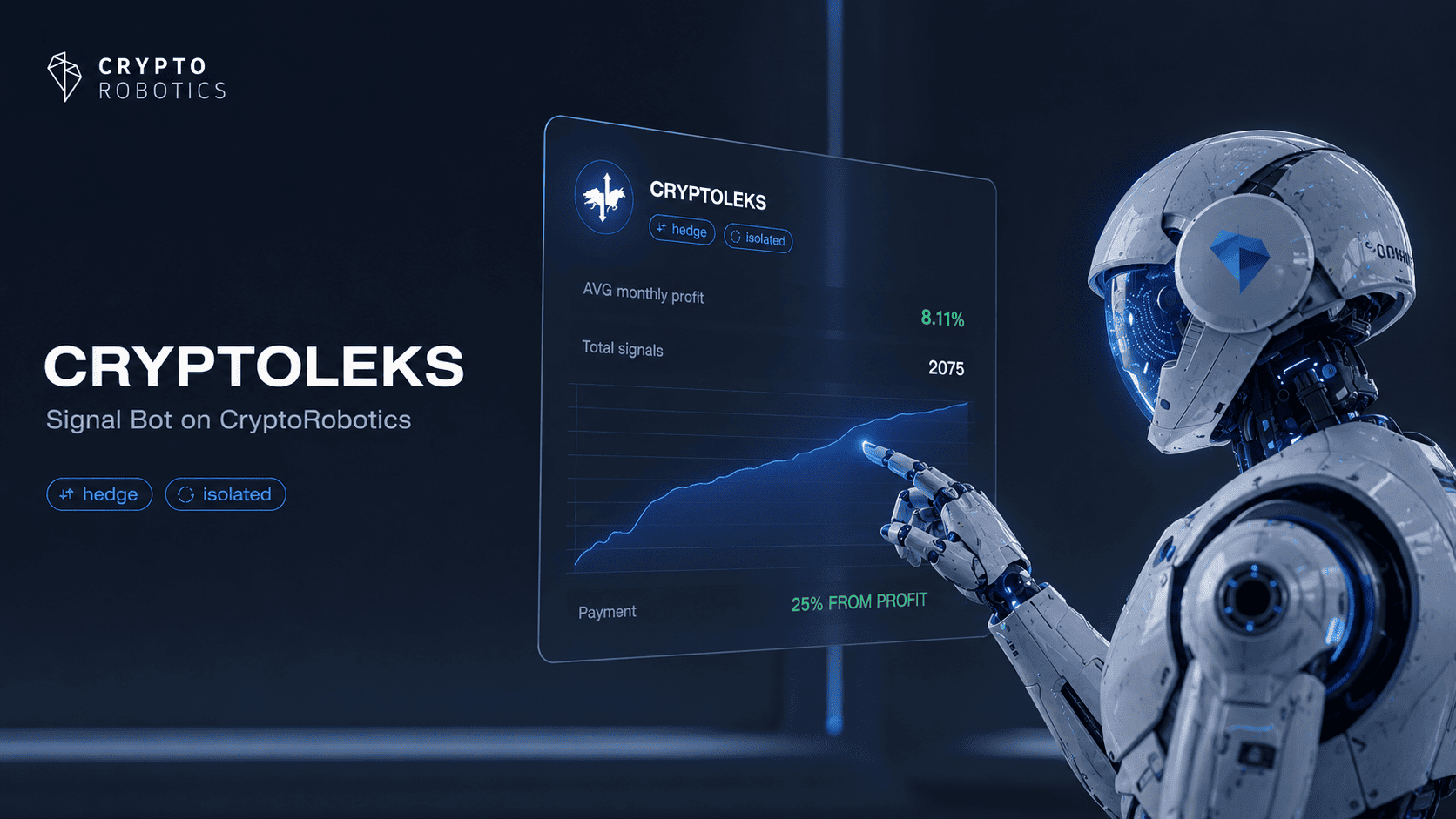


CRYPTOLEKS is an altcoin signal bot available in the Signal Bots section of CryptoRobotics. It is designed for users who want to connect an altcoin-focused signal strategy, configure execution settings, and manage risk through a structured bot interface.
Unlike regular Signals channels, CRYPTOLEKS is not only a source of trading ideas for manual review. It belongs to the Signal Bots category, where the user connects the tool, selects an exchange, adds an API key, chooses a risk strategy, defines balance settings, and decides whether to save or launch the bot.
The product is positioned around top altcoin signal logic. To keep the wording objective, it is better to describe CRYPTOLEKS as an altcoin-focused signal bot rather than as a guaranteed-profit tool. The payment model shown for CRYPTOLEKS is 25% from profit.
Users can explore signal bot tools inside CryptoRobotics through the signal bot section for automated signal execution, where signal-based products are separated from regular Bots and manual Signals channels.
CRYPTOLEKS is a crypto signal bot on CryptoRobotics. It is built for users who want a signal-based trading tool with configurable execution settings rather than a simple signal subscription.
The bot operates with hedge mode and isolated trading mode. These two features are important because they affect how positions and risk are handled on the exchange side.
CRYPTOLEKS supports several exchanges and modes, including Binance, Binance Futures, Binance.US, Bitget, Bitget Futures, Bybit UTA Futures, Bybit UTA Spot, Demo Futures, Demo Spot, KuCoin, MEXC, OKX, and XT.
The interface includes Connect and View statistics actions. After connecting the bot, the user can configure exchange access, risk strategy, target logic, main coins for trading, lot size, balance, and maximum drawdown.
CRYPTOLEKS works by combining signal-channel logic with bot execution settings. The user does not only read a signal and manually decide what to do. Instead, the user configures how the signal bot should operate.
The setup process includes:
This makes CRYPTOLEKS different from a regular crypto signals channel. It requires more setup, but it also gives the user more control over execution parameters.
For users who need a broader explanation of exchange connections, CryptoRobotics provides a guide on secure API key connection for trading accounts. This is relevant because CRYPTOLEKS requires exchange access before it can be configured.
CRYPTOLEKS uses hedge mode. In the interface, hedge mode is explained as simultaneous long and short trading. Users need to enable hedge mode on the exchange before using this functionality correctly.
Hedge mode is important because it can allow long and short positions to exist at the same time, depending on exchange rules and account configuration. This may be useful for certain signal strategies, but it also requires careful understanding from the user.
Investopedia explains hedging as a risk-management technique used to offset potential losses in one position with another related position. In trading, the principle is risk control, not guaranteed protection.
For CRYPTOLEKS users, the practical point is simple: hedge mode must be configured correctly. If the exchange account is not prepared for hedge mode, the signal bot may not work as expected.
CRYPTOLEKS also operates in isolated trading mode. The interface states that the channel operates in isolated trading mode, which means users should understand how isolated risk works before launching the bot.
In isolated mode, risk is usually separated at the position or trading-pair level instead of using the full account balance as shared margin. This can help limit exposure, but it does not remove trading risk.
Isolated trading mode is especially important for users who connect futures-related exchanges or modes. If the market moves sharply, incorrect settings can still lead to losses.
CRYPTOLEKS should therefore be used with clear position sizing, lot amount limits, and a maximum drawdown setting. Isolated mode can structure risk, but it cannot make a signal bot risk-free.
CRYPTOLEKS supports a wide list of exchanges and testing modes. This makes it more flexible than a signal bot connected to only one platform.
The supported options include:
These options can be grouped into spot exchanges, futures exchanges, and demo modes. Spot and futures trading have different risk profiles, so users should not treat every exchange option the same way.
Demo Spot and Demo Futures are useful for users who want to understand how the signal bot behaves before using live funds. Testing can help users review settings, risk strategy, lot size, and max drawdown logic.
The CRYPTOLEKS settings window gives users direct control over the main execution parameters. This is one of the main reasons the product should be described as a signal bot rather than a regular signal channel.
The settings include:
The example configuration shows Demo Spot as the selected exchange, a total balance field, a lot amount field, and USDT enabled as the main coin for trading. BTC is also available as a main coin option.
Users should treat these settings seriously. A wrong lot amount, incorrect balance allocation, or missing risk limit can change the practical risk of the signal bot.
CRYPTOLEKS allows users to select main coins for trading. The interface shows BTC and USDT as available options.
This setting matters because the selected main coin affects how the bot uses the available balance. A user who enables USDT, for example, should understand how much USDT is allocated and how the lot amount is calculated.
The example configuration shows USDT enabled and BTC disabled. It also shows a lot amount field, which means the user can define how much is used per order or signal execution.
This is a practical risk-control point. Even if the strategy is signal-based, the user still controls how much capital is exposed through the selected coin and lot amount.
CRYPTOLEKS includes three risk strategy options:
T1 Conservative is the more cautious option. It may be more suitable for users who prefer lower exposure and a more controlled setup.
T2 Moderate is the middle option. It may fit users who want a balance between activity and caution.
T3 Risky is the highest-risk profile. It should not be treated as the “best” option. It is only suitable for users who understand the additional exposure and are prepared to accept higher risk.
The choice of strategy should depend on the user’s risk tolerance, exchange mode, balance, lot amount, and experience with signal bots.
CRYPTOLEKS allows users to choose between Fixed target and Ladders. This setting affects how exits or target execution may be structured.
Fixed target is usually simpler. It can be useful when the user wants a straightforward target approach without dividing the position into multiple levels.
Ladders are more flexible. They can support a staged approach where the position is managed through multiple target levels or steps.
Neither approach is automatically better. Fixed target may be easier to understand, while Ladders may give more flexibility. The correct choice depends on the user’s strategy preference and risk plan.
CRYPTOLEKS uses a performance-based payment model. The payment shown is 25% from profit.
This makes CRYPTOLEKS different from monthly subscription signal channels. Instead of paying a fixed monthly price for signal access, the user pays a percentage from profitable activity.
A payment-from-profit model can be attractive because it is connected to profitable outcomes. However, it should not be misunderstood. It does not mean that the signal bot guarantees profitable trades.
The user should still evaluate:
CRYPTOLEKS should be separated from regular Signals channels on CryptoRobotics. A regular signal channel provides trading ideas that the user reviews and executes manually.
CRYPTOLEKS is different because it belongs to the Signal Bots section. The user connects the bot, configures exchange access, and defines trading parameters.
The difference is practical:
This distinction matters for users who search for crypto signal automation. CRYPTOLEKS is more advanced than a manual signal channel, but it still requires correct setup and monitoring.
CRYPTOLEKS has a different role from other signal-related tools on CryptoRobotics.
Easy Trade is focused on manual day trading signals based on technical analysis.
Kuresofa is a subscription-based signal channel with multi-exchange access.
AI Alpha Turbo is an AI-oriented high-risk signal channel.
Cryptosegnali focuses on leveraged short- and medium-term signals.
Crypto Crescente is positioned around risk-conscious signal access and asset protection.
CRYPTOLEKS is different because it is an altcoin-focused signal bot with hedge mode, isolated trading, risk strategy selection, and execution settings.
CRYPTOLEKS may be useful for users who want signal-based automation with configurable risk parameters.
Key benefits include:
The main benefit is not only signal access. The stronger value is the ability to configure how signal-based execution should work.
For users who want broader exchange setup context, CryptoRobotics has an article on best practices for integrating crypto exchanges. This is relevant because CRYPTOLEKS requires exchange connection before use.
CRYPTOLEKS should be used with realistic expectations. A signal bot does not guarantee profit, even when it has configurable risk settings and a profit-based payment model.
The main risks include:
Drawdown is especially important. Investopedia defines drawdown as a peak-to-trough decline, which is useful for understanding why the max drawdown setting matters in bot configuration.
Users should not launch CRYPTOLEKS without reviewing all settings. The bot can support automation, but the user remains responsible for configuration quality.
Position sizing is one of the most important parts of using CRYPTOLEKS. The lot amount setting defines how much capital is used in trading activity.
Investopedia explains position size as a core trading risk factor, because the size of a trade can determine how much a trader may gain or lose.
For CRYPTOLEKS, position sizing is connected to:
The max drawdown field should not be ignored. It helps users define a risk boundary before the bot starts trading. This is especially important when using T2 Moderate or T3 Risky.
To start using CRYPTOLEKS, users need to log in to CryptoRobotics and open the Signal Bots section.
The general process is:
Users should start carefully, especially if they are new to signal bots. Demo Spot or Demo Futures can help users understand configuration before using real funds.
CRYPTOLEKS may be suitable for users who want an altcoin signal bot with configurable execution settings.
The product may fit users who:
CRYPTOLEKS may not be suitable for users who want a simple manual signal channel. It is also not ideal for users who do not understand exchange settings, API access, lot amount, or drawdown.
Beginners should use caution. The tool has structured settings, but incorrect configuration can increase risk.
CRYPTOLEKS is an altcoin signal bot in the Signal Bots section of CryptoRobotics. It combines signal-based trading logic with configurable execution settings.
Yes. CRYPTOLEKS is a signal bot, not a regular Signals channel and not a standard trading bot.
No. A Signals channel provides trading ideas for manual review. CRYPTOLEKS allows the user to connect the signal bot and configure execution settings such as exchange, API key, risk strategy, balance, lot amount, and max drawdown.
CRYPTOLEKS supports Binance, Binance Futures, Binance.US, Bitget, Bitget Futures, Bybit UTA Futures, Bybit UTA Spot, Demo Futures, Demo Spot, KuCoin, MEXC, OKX, and XT.
Hedge mode allows simultaneous long and short trading, depending on exchange support and account settings. Users need to enable hedge mode on the exchange before using it correctly.
Isolated trading mode separates risk at the position or trading setup level instead of using the entire balance as shared exposure. It can help structure risk, but it does not eliminate losses.
CRYPTOLEKS offers T1 Conservative, T2 Moderate, and T3 Risky. Users should choose the strategy that matches their risk tolerance and trading experience.
The payment model shown for CRYPTOLEKS is 25% from profit. This is different from monthly subscription signal channels.
Yes. CRYPTOLEKS supports both Demo Spot and Demo Futures, which can help users test settings before live use.
No. CRYPTOLEKS does not guarantee profit. Market conditions, exchange settings, API connection, lot amount, risk strategy, and user configuration can all affect results.
CRYPTOLEKS is an altcoin-focused signal bot on CryptoRobotics designed for users who want more than manual signal review. It combines signal-based trading logic with exchange connection, API setup, hedge mode, isolated trading, and configurable risk strategies.
The product supports a broad list of exchanges and demo modes, including Binance, Binance Futures, Binance.US, Bitget, Bitget Futures, Bybit UTA Futures, Bybit UTA Spot, Demo Futures, Demo Spot, KuCoin, MEXC, OKX, and XT.
Its main value is configurability. Users can select T1 Conservative, T2 Moderate, or T3 Risky, choose Fixed target or Ladders, define main coins, set total balance, adjust lot amount, and control max drawdown.
For users who want altcoin-focused signal automation with hedge mode, isolated trading, risk strategy selection, and payment from profit, CRYPTOLEKS can be considered a practical altcoin signal bot on the CryptoRobotics platform.
Alina Garaeva: a crypto trader, blog author, and head of support at Cryptorobotics. Expert in trading and training.
Alina Tukaeva is a leading expert in the field of cryptocurrencies and FinTech, with extensive experience in business development and project management. Alina is created a training course for beginners in cryptocurrency.
Related Topics








Access the full functionality of CryptoRobotics by downloading the trading app. This app allows you to manage and adjust your best directly from your smartphone or tablet.

News
See more